Star Words






















What makes star words special?
At its core, Star Words Game is engineered to be mentally stimulating and highly enjoyable at the same time. Each level introduces a grid of letters that the players have to connect in order to be able to form meaningful words. The more words you build, the more stars you can get, and the faster you progress. This charmingly styled game with smooth animation and rewarding progression will undoubtedly please players of all ages.
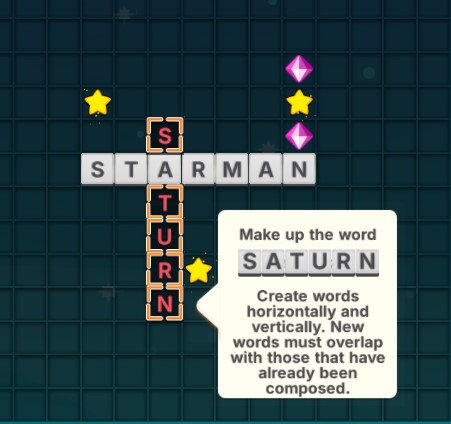
The versatility of Star Words Game Free lies in the fact that you can play it as you would any classic single-player game, or switch over to cooperative mode with friends sharing one screen. This game is social, really, perfect for parties, gatherings, or casual hangouts where several people want to engage in this activity together.
How to Play Star Words
Getting started with Star Words is easy: fire up the game on either your computer or mobile device, choose a mode to play in, and start creating words from the shuffled letter grid. You can play Single Player mode through dozens of levels, each with increasingly difficult and creative challenges. If you want something different, try puzzle mode or complete daily objectives for extra rewards.
Co-op mode mixes things up, as several players can build on words together. Friends can connect using their phones and add letters, really making this more of a collaborative, energetic word-building session.
Accessibility and Controls
The players could use the keyboard for fast and precise typing on the PC, while on mobile devices, users can tap on the letters directly on the screen. Star Words controls are intuitive, thus making this game easy to play for gamers of any level of skill. Co-op mode supports multi-devices that will allow everyone to join in on the fun easily.
Frequently Asked Questions
Is Star Words free to play?
Yes! You can start playing the game now on pipsnyt.io completely free of charge.
Can I play on my phone?
Of course, the game is fit for mobile play, ensuring smooth and responsive gameplay.
How do I access co-op mode?
Just select the co-op option from the main menu and start building words with friends around the same screen.
In addition, you can join me in games such as: Spellbound and Wordy